Productivity Tools
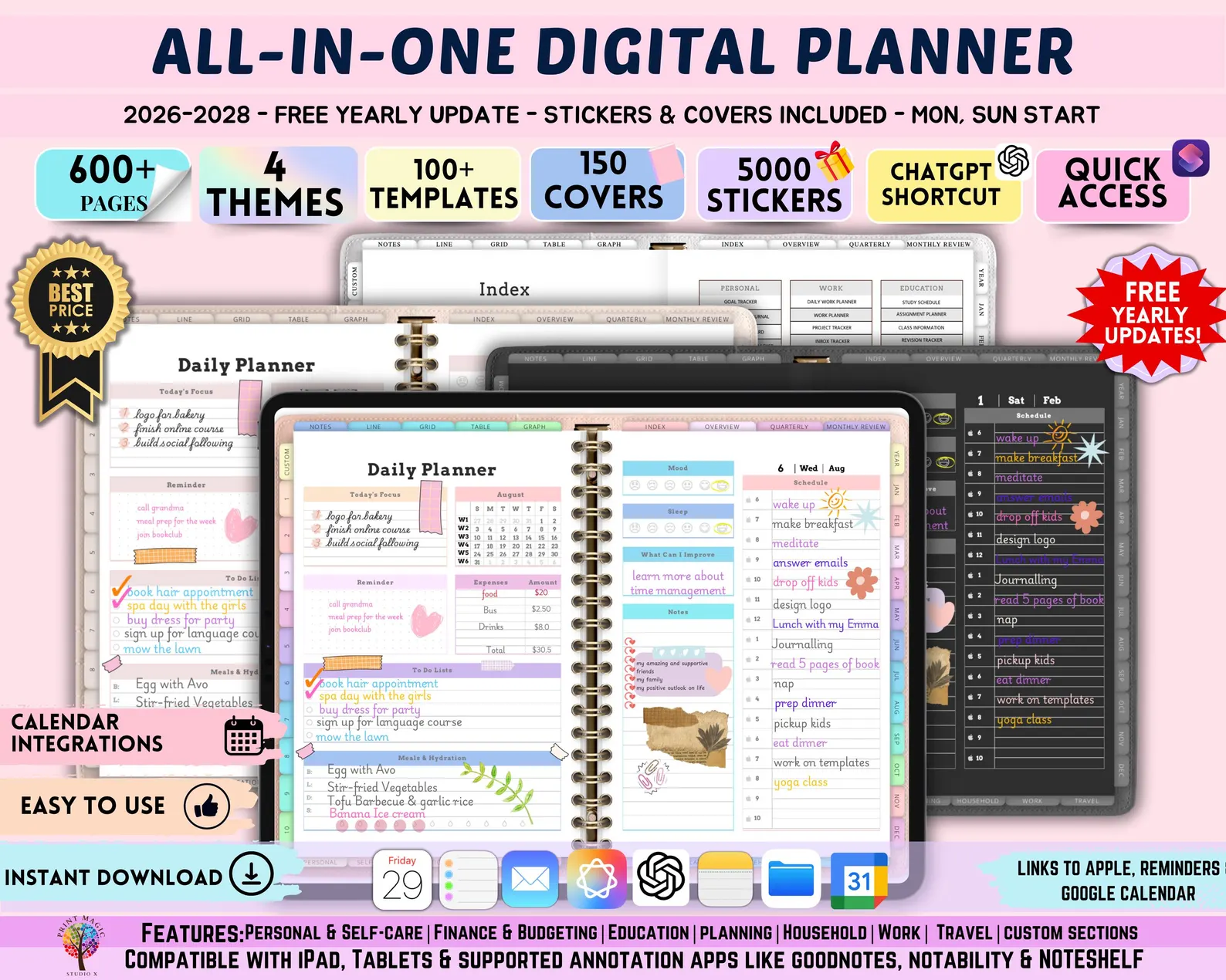
Master Your Future: The Ultimate All-in-One Digital Planner 2026-2028
Ready to get organized? Discover why the All-in-One Digital Planner for 2026, 2027, and 2028 is the final productivity tool you will ever need to buy.
Oct 11, 2026 · 4 min read
Why You Need a Future-Proof Digital Planner
In an era where our lives are increasingly fragmented across apps, physical notebooks, and loose sticky notes, the need for a centralized organizational system has never been greater. If you are tired of switching systems every year, the solution lies in a long-term strategy. By investing in an All-in-One Digital Planner that covers 2026, 2027, and 2028, you are not just buying a file—you are securing three years of consistent productivity and mental clarity.
Digital planning has revolutionized how we manage our time. Unlike paper planners that end up in a landfill once the year is over, a digital planner remains a permanent part of your device. Whether you use an iPad with GoodNotes, an Android tablet with Penly, or a desktop app, having a multi-year view allows you to set long-term goals without the anxiety of "starting over" every January.
Key Features of the All-in-One 2026-2028 Digital Planner
The beauty of a high-quality digital planner is its versatility. The All-in-One Digital Planner is designed to accommodate various planning styles, from the minimalist who loves a clean slate to the visual learner who prefers color-coding and stickers.
Hyperlinked Navigation
Navigation is the single most important factor in a digital planner. Our planners feature thousands of hyperlinked tabs that allow you to jump from a 2027 monthly view to a specific daily page in seconds. No more endless scrolling; just seamless access to the information you need, when you need it.
Integrated Digital Journaling
Productivity is only half the battle. Mental clarity and reflection are essential for high achievers. This planner includes dedicated journaling sections, habit trackers, and mood logs. By integrating your daily schedule with your personal reflections, you create a comprehensive narrative of your life across 2026, 2027, and 2028.
Customizable Templates
We understand that one size does not fit all. That is why our planner comes with an array of page templates, including:
- Project management workflows
- Budget and expense trackers
- Fitness and meal planners
- Goal setting and vision board spreads
- Dotted, lined, and blank pages for free-form creativity
Comparison: Digital Planner vs. Traditional Paper
| Feature | Digital Planner | Paper Planner |
|---|---|---|
| Sustainability | Zero waste; reusable | High waste; one-time use |
| Portability | Thousands of pages in one device | Heavy and bulky |
| Customization | Unlimited; copy-paste tools | Limited to existing layout |
| Syncing | Syncs across all devices | Stuck on one desk |
| Longevity | Multi-year (2026-2028) | Single year |
As you can see, making the switch to a digital format is not just a trend—it is a logical upgrade for anyone looking to optimize their workflow. You can get started today by grabbing your All-in-One Digital Planner.
Who Should Buy a Multi-Year Digital Planner?
This planner is designed for a diverse range of users who want to take control of their time:
- Students: Keep track of long-term academic calendars, study schedules, and exam dates across multiple semesters.
- Entrepreneurs: Manage business milestones, content calendars, and financial goals over a three-year horizon.
- Busy Parents: Organize family schedules, school activities, and household maintenance tasks in one accessible place.
- Goal-Setters: Perfect for those who believe in the power of tracking habits and progress toward long-term personal growth.
Getting Started: Tips for Success
Once you download your new planner, do not feel pressured to fill out every page immediately. The most successful planners start with a weekly "brain dump." Use the All-in-One Digital Planner to clear your head of all pending tasks, and then use the hyperlinked index to categorize them into your 2026, 2027, or 2028 folders. Remember, this tool is here to serve you, not to be a source of stress.
FAQ
Do I need special software to use this digital planner?
While you do not need specific paid software, you will need a PDF annotation app. Popular choices include GoodNotes, Notability, Penly, or Xodo, depending on whether you use an iPad, Android, or Windows tablet.
Can I move pages around within the planner?
Yes. Most PDF annotation apps allow you to duplicate, move, or delete pages within your planner. This allows you to customize the structure to suit your personal workflow perfectly.
Is this planner compatible with my phone?
While the planner is best experienced on a tablet with a stylus, it is fully compatible with any device that can open PDF files. You can easily view your schedule on your phone while on the go.
Why should I choose a 2026-2028 planner over a yearly one?
A multi-year planner saves you the effort of setting up a new file every year. It also allows you to see your long-term goals across a three-year span, which is crucial for building habits and achieving significant milestones.